1. Two commands that failed in similar ways
When a command fails in the Windows Codex CLI, the error shown on screen may not tell you which stage processing stopped at.
In the investigation described here, two incidents looked similar on the surface: both appeared as “the command failed” or “access was denied.” But Case A stopped at the process-creation stage and never reached the PowerShell command body. Case B reached PowerShell and Git, then stopped when access to .git/index.lock was denied.
The central question in this article is not only what the error string says, but where in the execution path the failure occurred.
This article is a practitioner case study based on two failures that actually occurred in a Windows Codex environment. It does not propose a new sandbox architecture. Instead, it focuses on an investigation procedure for separating intended protection from execution-runtime incompatibility without damaging the evidence.
In this article, “forensic” means reconstructing execution identity, authorization state, runtime logs, the resolved executable, and implementation behavior in an evidence-preserving way. It does not mean a legal evidence-preservation procedure or memory forensics.
2. The question is not “why” but “where it stopped”
When Codex executes a single command, it passes through multiple stages, including approval, execution identity, shell resolution, process creation, and access to files or directories. To organize the failure locations in this investigation, I consider those stages as seven layers. The following is an analytical failure-attribution model used in this article, not an official Codex architecture diagram. It is not an implementation state machine that every implementation necessarily traverses in this exact order; it is a diagnostic attribution model for isolating where a failure occurred.
1. Policy / approval
2. Execution identity
3. Executable / shell resolution
4. Process creation
5. Resource authorization
6. Tool-specific operation
7. Optional policy-controlled privilege transition
The fact that a command failed does not by itself show which stage had the problem. The first question to confirm is therefore not “why did it fail?” but “where in the execution path did it stop?” That difference in how the question is framed separated the two cases below.
3. Validation conditions and related reports
Investigation environment and settings
The following describes the environment used in this investigation and the settings changed for isolation.
Setting change. For isolation, I changed the Windows sandbox setting in Codex CLI’s config.toml from elevated to unelevated.
[windows]
sandbox = "elevated"
to:
[windows]
sandbox = "unelevated"
This change was an A/B condition for investigating whether the elevated Windows sandbox execution/setup path was related to the observed helper error. It was not made because unelevated had already been proven to be the correct permanent fix. The setting remained sandbox = "unelevated" during the later observations in Case A and Case B, and I continue to use this setting. As described later, I have not confirmed that changing to unelevated alone explains the entire case.
During the Case A isolation, a later PATH experiment changed the session PATH so that WindowsApps/MSIX PowerShell and conventionally installed PowerShell could be compared as a single variable. This was a test condition for changing which executable was selected.
I have not confirmed that adopting this setting alone explains the root cause of either case. I have not confirmed that the PATH change itself is the root cause, and I have not confirmed that elevated was the root cause of the complete incident.
Related reports
OpenAI’s official openai/codex issue tracker contains Windows sandbox reports with symptoms close to some of the local observations. More directly comparable to Case A, Issue #35871 reports that selecting the MSIX/Store build of pwsh.exe caused CreateProcessAsUserW to return error 5 (Access Denied), and that a controlled shell-selection comparison changed the result when WindowsApps was removed from PATH and a non-packaged shell was selected. This is close to the executable-selection and process-creation observation in Case A, but it is a third-party report by the issue author, not an engineering root-cause confirmation by OpenAI. Issue #35958 concerns an unelevated backend rendering a CreateProcessAsUserW denial as -1073283067; it explains that the value is 0xC0070005, whose low 16 bits are 0x0005, corresponding to ERROR_ACCESS_DENIED. This Issue is limited to error rendering and decoding and does not prove the underlying sandbox root cause.
As related reports, Issue #33388 reports that, in an elevated Windows sandbox, SetNamedSecurityInfoW returned 5 for C:\ProgramData\Temp; switching to sandbox = "unelevated" allowed normal sandbox commands to run, so unelevated was recorded as a workaround. Issue #27889 reports that, after a Codex Desktop 26.609 update/reinstall, elevated sandbox setup and ACL operations on a WindowsApps package directory resulted in SetNamedSecurityInfoW failed: 5, with errors also appearing in helper_unknown_error and ACL reads. These concern ACL setup and therefore differ from Case A in both sandbox mode and failing API, where CreateProcessAsUserW failed in an unelevated environment.
All four are third-party reports published in OpenAI’s official issue tracker. They provide external corroboration of similar symptoms, but none is an engineering root-cause confirmation by OpenAI or proof of the same root cause as the local observations.
4. Case A — The child process never starts
The submitted command failed with a generic helper/process error. The sandbox log recorded CreateProcessAsUserW failed: -1073283067. The PowerShell command body was never reached. Several hypotheses were possible, including syntax, command length, Git behavior, repository state, and helper instability.
The runtime log showed a more precise boundary. The selected executable was the following Microsoft.PowerShell MSIX payload:
C:\Program Files\WindowsApps\Microsoft.PowerShell_7.6.5.0_x64__8wekyb3d8bbwe\pwsh.exeCreateProcessAsUserW returned access denied before the requested PowerShell command body was executed. One observed error value was -1073283067 (0xC0070005); the lower Win32 code was 5, corresponding to ERROR_ACCESS_DENIED.
According to the Codex source and OpenAI’s publicly available Windows sandbox technical material, the Windows execution boundary builds a restricted primary token and starts child processes through the CreateProcessAsUserW path. This allowed the incident to be reclassified from “command failure” to an authorization failure at the process-creation stage.
The package itself existed and was in a normal state. The read-only investigation confirmed that the failure was not caused by a missing alias or absent executable. Package corruption or missing files was not supported.
I then ran an experiment that changed one variable at a time. I changed shell-resolution priority so that conventionally installed PowerShell (C:\Program Files\PowerShell\7\pwsh.exe) was selected instead of the MSIX version. The command that had failed with the MSIX version then launched normally. When WindowsApps resolution was preferred again, the failure returned. The result showed that the resolved executable could change the outcome under the same host and repository conditions. This supported choosing the narrow operational workaround of preferring conventionally installed PowerShell, rather than disabling the sandbox or changing WindowsApps security.
At this point, ordinary ACL inspection was not enough. The ACLs on WindowsApps, the package directory, and the executable showed ordinary Read/Execute permission for principals including NT AUTHORITY\RESTRICTED, which weakened the simple explanation that the restricted token merely lacked execute permission. Inspecting the raw SDDL revealed a conditional ACE based on package identity.
WIN://SYSAPPID Contains "Microsoft.PowerShell_8wekyb3d8bbwe"This is evidence that the MSIX execution surface has authorization semantics conditioned on package identity. It does not prove that this conditional ACE itself was the final rejecting condition in the failed CreateProcessAsUserW call.
Taken together, the selected target being a registered Microsoft.PowerShell MSIX version, the failure occurring before command execution, the local avoidance with the non-MSIX version, and the presence of a WIN://SYSAPPID conditional ACE in the package/executable SDDL are all confirmed observations. Explanations based on missing files, package corruption, or a simple ordinary Read/Execute denial are not supported.
On the other hand, the interpretation that restricted-token process creation interacted incompatibly with the selected MSIX/package-aware execution surface in this environment is strongly supported but not confirmed. The exact Windows-internal access-check constituent that ultimately returned ERROR_ACCESS_DENIED remains unresolved.
That unresolved point did not affect the operational decision required here: to adopt the workaround of preferring conventionally installed PowerShell. No further low-level internal analysis was performed. This is a narrow conclusion about what was unnecessary for this particular decision, not a general claim that unresolved questions are unimportant.
5. Case B — The process starts, but a protected resource rejects the write
In a separate incident, a Git staging operation failed with the following error:
.git/index.lock: Permission deniedPossible but unsafe responses included deleting ACL entries, changing repository ownership, always running with elevation, or assuming that an unresolved SID was an old leftover ACL entry. None of these was performed during evidence collection.
What was observed was that PowerShell started and Git started. The failure occurred when Git attempted to create .git/index.lock. This incident therefore belonged to file-system/resource authorization, not process creation.
Read-only inspection of the child process’s TokenRestrictedSids found the same synthetic capability SID that also appeared in the repository ACLs. The effective relationship was:
Repository root
  <workspace-capability-SID> -> Modify allowed

.git
  same SID -> write/delete denied
The same capability SID was associated with the active workspace through the persistent state held by the Codex sandbox.
In ordinary Windows account-name resolution, friendly names could not be obtained for several synthetic S-1-5-21-* entries. Taken alone, this could lead to the incorrect classification “unresolved entry = old orphaned ACL.” However, one of these unresolved SIDs was simultaneously present in the active child-process token’s restricted SID set, allowed Modify access on the repository root, explicitly denied write/delete access on .git, and associated with the active workspace through persisted Codex capability state. The principle that follows is that failure to resolve a name is not a test of activity or validity. Synthetic security identities may intentionally remain unresolved through ordinary account lookups.
OpenAI’s public Windows sandbox technical material explicitly describes .git as one of the protected paths within an otherwise writable workspace. It also describes enforcing workspace-level write restrictions through synthetic SIDs and restricted write tokens. Combining this documented implementation with the sequence of local forensic confirmation—the active restricted capability SID, the repository-root Allow ACE, the .git Deny ACE, the persisted capability mapping, and the actual index.lock denial—made it possible to reconstruct how the protection operated on this machine.
The same Git operation succeeded through an approval/escalation-controlled higher-privilege execution path. The source code and OpenAI material describe the sandbox and approval policy as separate controls. The sandbox defines the technical boundary; policy determines whether and how that boundary may be crossed.
Normal sandbox permissions
        ↓
Protection boundary rejects the operation
        ↓
Policy-controlled privilege transition
        ↓
Retry with higher privileges
This article does not generalize that every privilege transition should always require manual human approval. The important properties are that the transition is explicit, policy-controlled, and distinguishable from the ordinary permission hierarchy.
In summary, the start of the child process and Git, the failure at creation of .git/index.lock, the consistent appearance of the active capability SID in both the restricted token and the ACLs, the explicit documentation of .git write protection by OpenAI, and success through the approval/escalation path were all confirmed. Residual index.lock, repository corruption, and “unresolved SID = orphaned account” are not supported interpretations. The operational decision was to preserve the .git protection and use the policy-controlled higher-privilege path rather than weaken the ACL boundary.
6. Why the failures looked the same on the surface
The value of placing the two cases side by side is that their surface symptoms were similar while their stopping positions were entirely different.
Case A
Executable resolution → Process creation → Denied
The child command never starts

Case B
Executable resolution → Process creation → Success
Resource authorization → Denied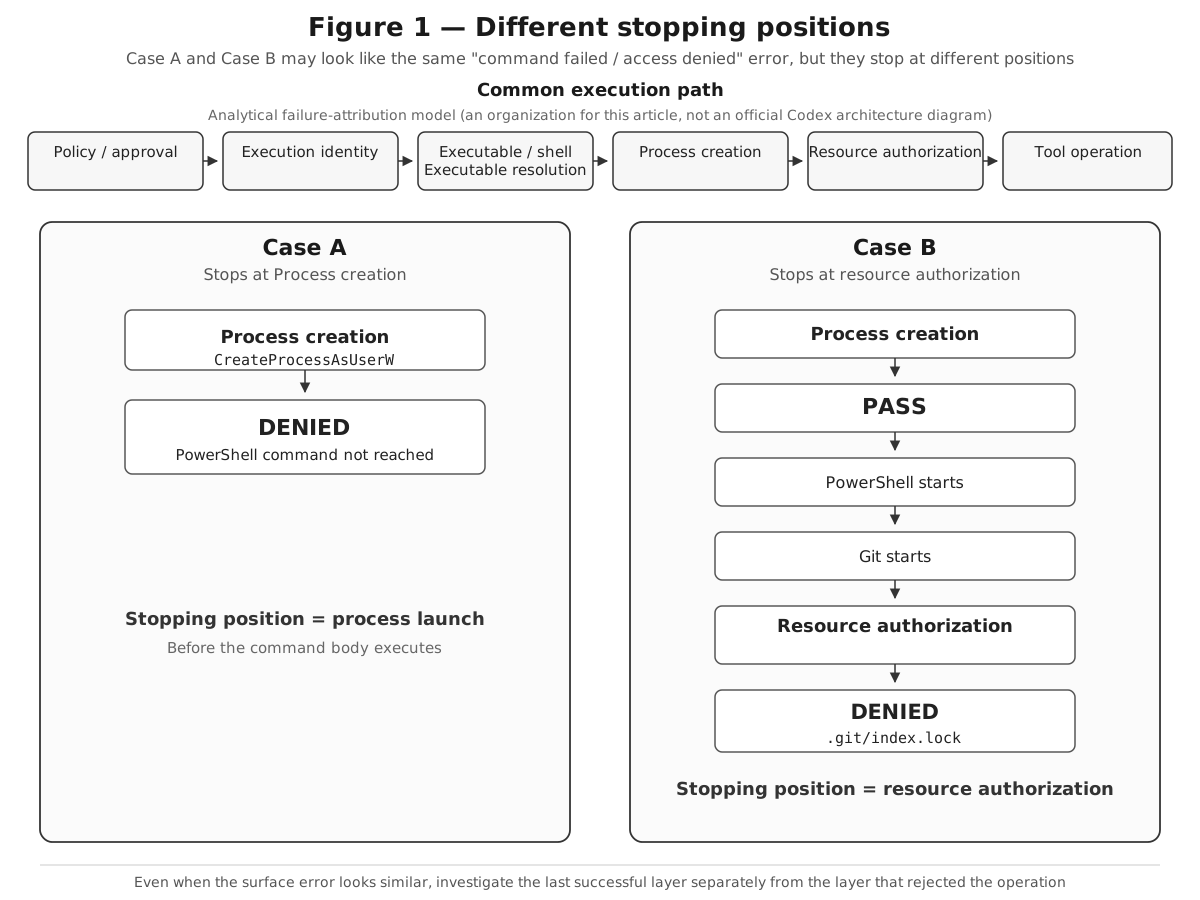
On the surface, both looked like the same phenomenon—“the command failed”—but they stopped at different execution stages. The lesson here is not a proposal for a new sandbox architecture; it is to determine where in the execution path the failure occurred.
7. Investigating while preserving the evidence
In these two investigations, I proceeded through the following seven stages to separate the failure locations.
1. Identify the last layer that succeeded
First determine whether the child process was created.
- If the child process was not created, investigate executable resolution, execution identity, the process-creation API, package identity, and the launch policy.
- If the child process was created, proceed to exit status, resource authorization, tool-specific semantics, and privilege-elevation behavior.
This single branch kept Case A and Case B from being treated as one diagnosis.
2. Preserve the environment before remediation
Before changing ACLs, ownership, sandbox state, package installation state, or system security policy, preserve the exact resolved executable path, process-launch result, token identity and restricted SIDs, ACLs and raw SDDL, sandbox capability state, runtime logs, relevant implementation source, vendor material, and the approval/elevation path.
3. Change one variable at a time
The experiment that worked in Case A changed only shell resolution. Reinstalling the package or resetting permissions in bulk would have produced results that were harder to interpret. A diagnostic experiment should provide information whether it succeeds or fails.
4. Inspect deeper security information when necessary
In Case B, whoami /groups did not reveal the decisive capability SID; it became visible by inspecting TokenRestrictedSids directly. In Case A, Get-Acl and AccessToString did not display the package-aware condition; the raw SDDL did.
| Ordinary check | Missing information | Additional check |
|---|---|---|
whoami /groups |
Decisive capability SID | TokenRestrictedSids |
Get-Acl / AccessToString |
Package-aware condition | Raw SDDL |
The lesson is not to abandon convenient tools, but to go one level deeper when their abstraction hides the fact being investigated.
5. Cross-check independent evidence sources
The stronger the same mechanism can be reconstructed from multiple sources—runtime tokens, ACL/SDDL, persisted capability state, logs, implementation source, vendor material, and controlled A/B behavior—the stronger the conclusion. No single evidence source establishes a complete interpretation by itself.
6. Separate intended denials from implementation problems
ACCESS_DENIED can represent multiple categories. Case B was an intended, documented protection boundary; Case A was strongly supported as an execution-compatibility problem between the selected packaged execution surface and the restricted process-creation path. The error code alone does not distinguish them.
7. Stop when the evidence runs out
A mature investigation records clearly what was confirmed, what is strongly supported, what was rejected, and what remains unresolved. The goal is not to eliminate every unknown, but to reduce uncertainty enough to make the necessary decision.
8. Misconceptions to avoid
The intuition “access denied means permissions should be fixed” overlooks the possibility that the denial is an intended control. The assumption “unresolved SID means an old leftover ACL” overlooks the possibility that synthetic capability identities are intentionally unresolvable. The judgment “the same command failed, so it is the same bug” overlooks the difference between one failure before process creation and the other after the child tool started. The conclusion “it works when elevated, so elevation is the correct fix” mistakes a useful isolation method for a reason to permanently broaden permissions. Finally, “the workaround worked, so the root cause is proven” is also wrong. The non-MSIX workaround in Case A isolated executable/package selection as a trigger, but did not prove the final Windows-internal rejecting condition.
9. What the agent execution runtime should make observable
Evidence-preserving diagnosis becomes easier when the runtime directly exposes the security path itself. The practical point from this case is that it should be possible to answer which executable was resolved, which execution identity was used, whether the process was created, which resource boundary rejected the operation, whether the tool itself returned an error, and whether higher privileges were considered or attempted.
Specifically, the following information would be useful:
- The resolved executable path and related package/application identity
- Failure categories that distinguish resolution failure, process-creation denial, resource-authorization denial, tool-exit failure, approval denial, and higher-privilege retry failure
- Capability visibility that does not require an operator to reverse-engineer synthetic SIDs
- An explicit description of resource classes that remain protected even within a writable workspace
- Records that make it possible to reconstruct when and why processing moved from the ordinary execution hierarchy to a higher-privilege path
A system that closes over the failure and returns only an opaque helper error is safer than a system that silently broadens permissions, but operationally weaker than a system that also shows which layer rejected the operation.
10. What this case does not establish
This case does not establish that every AI-agent sandbox should use Windows restricted tokens, synthetic SIDs, or NTFS Deny ACEs. It does not establish that .git should always be protected from an agent, that all MSIX applications are incompatible with restricted execution, or that every privilege transition should require manual approval. It does not establish a new multi-layer architecture or claim academic novelty for the underlying security principles. The generalization is narrower: AI-agent tool execution can cross multiple enforcement layers; failures should be attributed to the layer where they occur; intended protection and execution incompatibility can produce superficially similar denial symptoms; and efficient separation requires runtime observability and an evidence-preserving investigation procedure.
11. Conclusion
The investigation began as a vague problem described as recurring Windows helper instability. In practice, it separated into two security events with different characteristics. One was a confirmed failure in which no child process was created and execution stopped at process creation. The A/B behavior in which selecting the MSIX versus non-MSIX executable changed the result was also confirmed, so the interpretation that the restricted execution path interacted incompatibly with the packaged execution surface selected in this environment is strongly supported. However, the exact Windows-internal access-check constituent that ultimately returned ERROR_ACCESS_DENIED remains unresolved. The other was a failure in which a workspace-scoped restricted identity collided with .git write protection: ordinary workspace edits were allowed, Git metadata writes were denied, and the same operation succeeded through a policy-controlled higher-privilege path.
The first question to ask is not only “what error is this?” but “where in the execution path did it stop?” ACCESS_DENIED alone cannot distinguish a process-creation denial from a .git resource-authorization denial after PowerShell and Git have started. Intended protection boundaries and execution-compatibility problems must be separated, and confirmed observations, strongly supported interpretations, and unresolved points must be handled separately.
This article does not propose a new security architecture for AI agents. The security controls discussed here belong to existing modern sandbox designs. Its contribution is the evidence-based reconstruction of a failure: rebuild the execution path, identify the last layer that succeeded, preserve the environment, inspect effective identity and authorization data, cross-check local evidence against source code and vendor material, change one variable at a time, separate intended controls from incompatibility, and stop at the boundary of the evidence. This way of separating failures can also be applied to agent execution runtimes other than the Windows Codex CLI when they have multiple execution and authorization stages. Investigate not only what the error is, but where the execution stopped, to support safe operational decisions without weakening the controls.
Reproduction / evidence checklist
When reproducing or investigating a similar event, record the following before remediation:
- The resolved executable or shell path
- Whether the child process actually started
- The effective token identity and restricted SIDs, including
TokenRestrictedSidswhen necessary - The target resource’s ACL and raw SDDL
- Sandbox and runtime logs
- Persisted capability and workspace state where applicable
- The controlled A/B condition and, where applicable, the result through the approval/elevation path
This is an evidence-collection checklist, not a procedure for changing ACLs, ownership, or sandbox protection boundaries.
References
- OpenAI, Building a safe, effective sandbox to enable Codex on Windows, 2026-05-13. https://openai.com/index/building-codex-windows-sandbox/
- OpenAI, Running Codex safely at OpenAI, 2026-05-08. https://openai.com/index/running-codex-safely/
- OpenAI, openai/codex Issue #33388 — Windows elevated sandbox permanently fails with SetNamedSecurityInfoW error 5 on C:\ProgramData\Temp. https://github.com/openai/codex/issues/33388
- OpenAI, openai/codex Issue #27889 — Windows elevated sandbox setup fails after Codex Desktop 26.609 update/reinstall: SetNamedSecurityInfoW failed: 5 on WindowsApps package directory. https://github.com/openai/codex/issues/27889
- OpenAI, openai/codex Issue #35871 — Windows sandbox: CreateProcessAsUserW fails with error 5 when the resolved shell is the MSIX (Store) build of pwsh. https://github.com/openai/codex/issues/35871
- OpenAI, openai/codex Issue #35958 — Windows sandbox (unelevated): CreateProcessAsUserW denial rendered as -1073283067 instead of the decoded error. https://github.com/openai/codex/issues/35958
The first two references establish the documented architectural context and help avoid overstating novelty. Issues #35871 and #35958 are closer external reports for Case A, while #33388 and #27889 are related Windows sandbox ACL-setup reports; all four are treated as supplementary evidence supporting the incident-specific analysis.